Poweramp Equalizer
- 4.4
- Rating
- 5.00M
- Installs
- Free
- Price

 Analysis by App-foxy
I like audio apps that let me solve a real listening problem without forcing me to replace my music service or rebuild my library. Poweramp Equalizer takes that approach: it works as a dedicated sound-adjustment tool for Android, with controls aimed at people who want more than the basic tone sliders built into a phone. The focus is on shaping playback through equalization, bass adjustment, and AutoEQ rather than managing songs itself.
After spending time with it, my impression is that this is a capable companion for headphones, earbuds, speakers, and other playback setups, but it is not an entirely effortless “install and forget” utility. The sound controls are the attraction, while the first-use setup and the way Android handles audio in the background are where some users may need patience. The best results come from treating it as an audio workflow, not just a bass button.
What Poweramp Equalizer is really useful for
Poweramp Equalizer belongs in the Music & Audio category and is developed by Poweramp Software Design (Max MP). Its purpose is straightforward: give me more control over the character of music than the standard system audio panel usually offers. The store summary highlights a powerful equalizer, bass boost, and AutoEQ, and those three ideas describe the app’s main appeal well.
You May Also Like

 Blood Strike: 2.5 Anniversary
Blood Strike’s Loadouts Turn Every Drop Into a Tactical Gamble
A close look at Blood Strike’s custom loadouts: how fast access to signature weapons reshapes its battle royale rhythm, rewards preparation, and narrows the gap between fights.

 Pandora - Music & Podcasts
Pandora’s Music Is Easy to Start, but Harder to Recover
Pandora’s strength is its low-effort path from a seed to a station. Its weak spot is how much confidence it asks you to place in connection, setup, and quiet recovery.

 8 Ball Pool
 Is Built on Rivalries, Rematches, and Routine
A close look at the rivalries, rematches, shared routines, and unanswered safety questions that turn a quick pool match into a persistent mobile community.

 Samsung Music
’s Quiet Strength Is Playing What You Already Own
Its reach comes less from spectacle than from dependable access to a personal library. That simplicity is both the app’s strongest retention engine and its ceiling.

 AccuWeather: Weather Radar
AccuWeather Review: A Quick, Clear Forecast for Everyday Decisions
For everyday plans, the best forecast is the one you can understand quickly. AccuWeather makes rain timing, radar, and local conditions easy to act on, with a few trade-offs.

 Hill Climb Racing
Why Hill Climb Racing Still Turns Crashes Into One More Run
A tiny car, a bumpy hill and one more upgrade: Hill Climb Racing keeps resurfacing because its simple chaos makes every near-miss feel personal.
More From Our News Desk



The equalizer is useful when a pair of headphones sounds too dark, voices sit too far back, or bass feels weak at ordinary listening levels. Instead of changing the whole phone’s sound blindly, I can make smaller adjustments and listen for whether the result actually improves the track. That distinction matters because a dramatic curve may sound exciting for a few minutes but become tiring during a longer session.
AutoEQ is especially interesting for people who do not want to begin by adjusting every frequency manually. A suitable correction can provide a more balanced starting point, after which I can make personal changes. I would still listen carefully rather than assuming any automatic profile is perfect. Headphone fit, ear shape, recording quality, and personal taste all affect whether a correction feels natural.
The bass control has a similar trade-off. It can make electronic music, films, and games feel fuller, but too much low-end adjustment can cover vocals and reduce clarity. I found it more useful for gentle compensation than for pushing every track toward maximum impact. If the source already has heavy bass, a smaller change is usually more enjoyable.
The first place many users get stuck
The most important early question is not “Which preset sounds best?” It is “Is the app actually affecting the audio path I am using?” Android phones, music players, streaming services, Bluetooth devices, and wired accessories do not always behave identically. A user may change a control, hear no difference, and assume the equalizer is broken when the real issue is that the current playback route is bypassing or limiting the processing.
My practical advice is to test with one familiar song and one output device first. Keep the change obvious but safe, such as lowering or raising a broad part of the spectrum briefly, then return to a comfortable setting. Switch back to the original sound and compare again. This simple test is more reliable than trying to judge a subtle adjustment while also changing headphones, apps, and connection methods.
Bluetooth can make this diagnosis harder because the phone and the wireless device are both involved in handling the signal. A difference between wired and wireless playback does not automatically prove that Poweramp Equalizer is at fault. It may reflect the output device, its own sound processing, or the way the phone routes audio. Testing one route at a time prevents a lot of guesswork.
A calmer setup saves time
I would begin with the app’s main controls at neutral or conservative positions, then play several familiar recordings. Start with music that contains clear vocals, steady bass, and instruments in the upper range. This gives me three reference points: whether speech remains intelligible, whether bass becomes muddy, and whether cymbals or high notes become harsh.
AutoEQ is best treated as a starting point rather than a final answer. If I use it, I compare the corrected sound with the uncorrected version at a similar listening level. Louder often sounds better at first, even when it is simply louder. After that comparison, I make one change at a time. Adjusting bass, overall equalization, and other controls together makes it difficult to know which change helped.
Another useful habit is to keep separate expectations for different devices. A profile that improves small earbuds may sound excessive through a car system or a larger speaker. I would not chase one universal setting for every situation. The app becomes more practical when I think in terms of “my usual earbuds” and “my living-room speaker” rather than one permanent curve.
Users also commonly wonder whether they need to change their music player. In my experience, the sensible approach is to keep the player they already enjoy and test whether the equalizer works with it. If playback is unaffected, the player or output route may be handling audio in a way that prevents the expected result. Changing several apps at once only makes the problem harder to identify.
Recovering a workflow when playback changes
A typical everyday situation looks like this: I listen to music through earbuds on the way to work, then later connect to a Bluetooth speaker. The first setup sounds balanced, while the second is suddenly boomy or too quiet. The tempting response is to keep adjusting the same curve until both seem acceptable. That usually produces a compromise that is ideal for neither device.
A better workflow is to return to a neutral baseline, confirm which output is active, and make a small adjustment for the new device. I also avoid judging a change from a single song. One recording can hide problems that become obvious with another style of music. A short playlist containing vocals, acoustic instruments, and bass-heavy material gives a more trustworthy impression.
If the effect disappears after changing players or reconnecting a device, I repeat the basic test rather than immediately rebuilding all settings. Close and reopen the playback app, reconnect the audio device, and check whether the same output is selected. These are ordinary recovery steps, but they matter because audio routing can change without the equalizer itself having changed.
When I am troubleshooting, I change only one variable at a time: the player, the output device, or the equalizer setting. I do not change all three together. If the effect returns after one specific change, I have a useful clue. If it does not, I can move on without assuming that a complicated sound profile is the solution.
It is also worth keeping expectations realistic after a phone update or a change in audio hardware. A setup that worked perfectly before may behave differently afterward. That does not necessarily mean the app has lost its settings or that the developer has removed a feature. The safest approach is to repeat the neutral-versus-adjusted comparison and confirm the active playback route again.
When the app is not the cause
Some sound complaints originate in the recording, the headphones, or the listening environment. If only one album sounds distorted, the source may already be clipped or aggressively mastered. If vocals are unclear on every device, the problem may be the recording rather than the equalizer. If the sound changes when an earbud seal shifts, no software curve can fully compensate for that physical difference.
Volume is another common source of confusion. Raising bass or several frequency bands can reduce headroom and make distortion more likely, especially when the original track is already loud. When I hear crackling after an adjustment, I lower the overall level and undo the most aggressive changes before blaming the app. A gentler curve is usually more useful than trying to force a damaged signal into shape.
External audio equipment can also have its own equalizer or enhancement mode. Stacking several processing layers may create an exaggerated result, with too much bass, sharp treble, or an unnatural hollow quality. For a clean test, I disable extra sound effects where possible, evaluate Poweramp Equalizer on its own, and then decide whether another layer adds anything worthwhile.
This is where the app differs from a simple system sound panel. It gives me more room to experiment, but more control also means more ways to create an unpleasant result. A basic phone equalizer may be better for someone who wants a single quick adjustment and never wants to troubleshoot audio routing. Poweramp Equalizer is more suitable for someone willing to listen, compare, and refine.
Who will get the most from it
I would recommend it to listeners who use the same Android device with several headphones or who are dissatisfied with the default sound of a particular pair. It is also a good fit for people who enjoy learning what different frequency changes do. AutoEQ lowers the barrier to entry, while manual adjustment gives experienced listeners room to personalize the result.
It makes sense for someone who wants to improve everyday listening without replacing a preferred music player. A commuter might use a restrained bass adjustment for thin-sounding earbuds, then switch to a flatter approach at home. Someone watching video content may prefer clearer speech, while a music listener may prioritize a more even balance across instruments.
I would be less enthusiastic for a person who expects every audio source and every wireless device to respond identically with no setup. The app is not a magic repair tool for poor recordings, damaged hardware, or an unstable connection. It also may feel excessive if the phone’s built-in controls already provide exactly the small adjustment the user wants.
There is a learning curve, even though the basic idea is easy to understand. The challenge is not finding a slider; it is making changes that improve one listening situation without making another worse. Users who enjoy that process will probably appreciate the flexibility. Users who dislike audio experimentation may prefer a simpler player with a few fixed sound modes.
Cost, compatibility, and the practical details
The app is free to install, with in-app purchases listed at $6.99 per item. That makes it easy to try before deciding whether its deeper control is worth paying for. I would spend time testing it with my actual headphones and usual music apps rather than judging it from a quick launch. The value depends heavily on whether it solves a sound problem I genuinely have.
It is rated for Everyone and requires Android 9 or later. The current version is build-1021-bundle-play, and the app has been available since March 9, 2021. Those details make it relevant to a broad range of Android users, although compatibility on paper does not guarantee identical behavior across every phone, player, and output device.
Its public reception is strong, with a 4.4 average from around 23 thousand ratings and more than 5 million installs. I see that as a useful sign that the concept works for many listeners, not as a promise that every setup will behave the same way. Audio processing is unusually dependent on the combination of hardware, software, and listening route.
Compared with the usual alternatives, the main advantage here is focus. A music player with built-in equalization may be more convenient if all listening happens inside that player, while a phone-wide sound panel may be easier for quick changes. Poweramp Equalizer sits between those options: it is more dedicated than a basic system control, but it still asks me to verify how each playback setup responds.
My practical verdict
Poweramp Equalizer is worth trying when the default sound of an Android device or a particular pair of headphones leaves me wanting more control. Its combination of equalization, bass adjustment, and AutoEQ can turn a frustrating listening setup into a more comfortable one, especially when I use conservative changes and test with familiar tracks.
The main limitation is not a lack of ambition; it is the friction around real-world audio paths. When an adjustment seems ineffective, I need to check the player, connection, output device, and volume before deciding that the app has failed. That extra work will annoy people who want instant results, but it is manageable for listeners who care about tailoring sound properly.
My recommendation is to install it with one clear goal, test one output device, and begin with small changes. If AutoEQ gives me a better starting point, I keep refining from there rather than stacking effects. If the sound still does not improve after a neutral comparison and a clean test, I look at the source or hardware instead of endlessly moving sliders.
For me, the app earns its place when I want deliberate control over everyday listening, not when I need a universal fix. It is a focused free Music & Audio app from Poweramp Software Design (Max MP), and its strongest quality is the ability to make a personal setup feel more intentional. Just be prepared to spend a little time confirming that the audio route is actually the one being processed.
FAQs for Poweramp Equalizer
01What is Poweramp Equalizer, and what does it do?
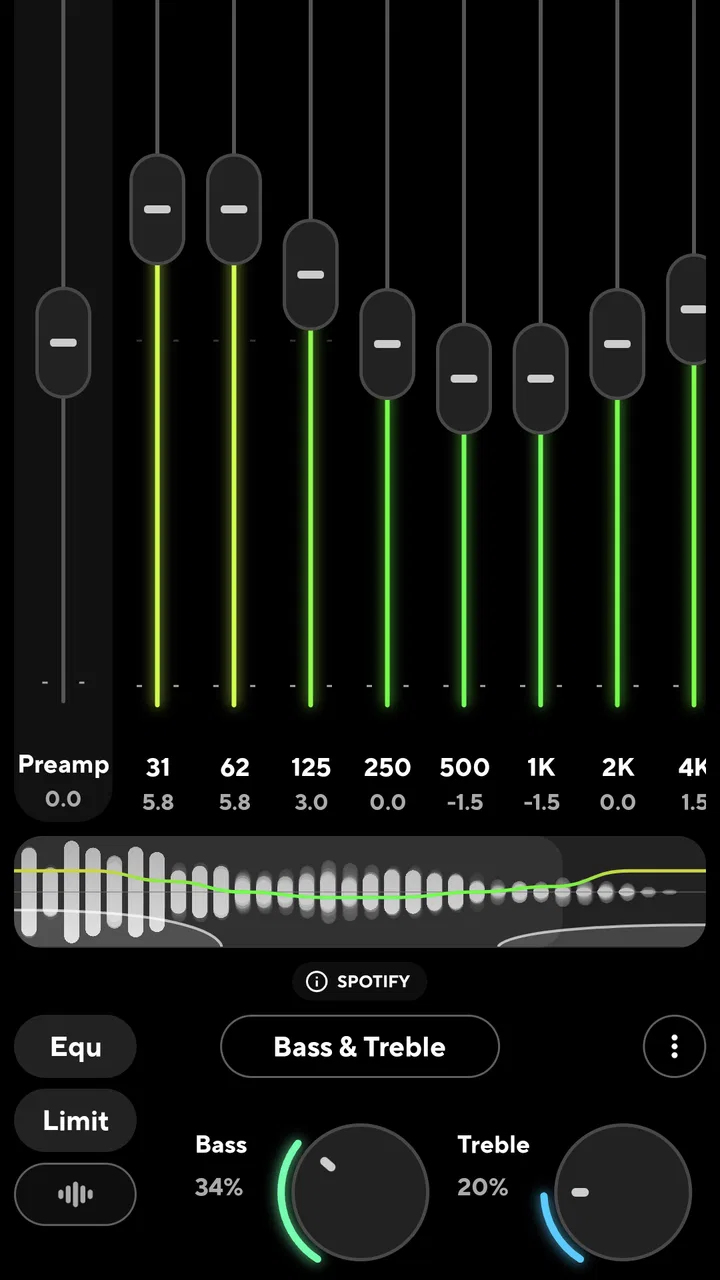
Poweramp Equalizer is an advanced audio-processing app for Android that lets you customize the sound produced by other music players, streaming services, and video apps. It offers a graphic equalizer, bass and treble controls, compression, balance adjustment, reverb, limiter, and other tools. During testing, its main strength was the amount of control available for creating a sound profile that matches your headphones, car stereo, or personal preferences.
02Does Poweramp Equalizer work with Spotify, YouTube, and other music apps?
Poweramp Equalizer can work with many compatible audio applications, including popular music players and streaming services, but compatibility may depend on the Android version, the audio output method, and restrictions imposed by the individual app. Some services may require specific settings or an alternative processing mode. If effects do not apply immediately, checking the equalizer’s compatibility options, audio session settings, and battery restrictions usually helps resolve the problem.
03Is Poweramp Equalizer free to use, or does it require payment?
Poweramp Equalizer can generally be installed and tested without paying immediately, but some advanced features may require a purchase or license after the trial period. The exact availability of features and pricing can change, so users should check the current Google Play listing before downloading. The free experience is useful for testing compatibility, while serious audio enthusiasts may find the full version worthwhile because of its extensive customization options.
04Can beginners use Poweramp Equalizer, or is it only for audio experts?
Beginners can use Poweramp Equalizer, although the interface may initially feel more technical than a simple bass-boosting app. It includes presets and straightforward controls, allowing new users to start with small adjustments before exploring advanced tools. I recommend changing one setting at a time and avoiding excessive volume or bass boosts, since aggressive processing can cause distortion, reduce clarity, or potentially make listening uncomfortable.
05Does Poweramp Equalizer affect battery life or sound quality?
Poweramp Equalizer may use additional battery and system resources because it processes audio in real time, although the impact is usually modest on modern Android devices. Sound quality depends heavily on the chosen settings and the headphones or speakers being used. Well-adjusted equalization can improve clarity and balance, while extreme boosts may introduce distortion. Users should also verify that Android battery optimization is not interrupting audio processing.
Pros
- Works with most music players and streaming apps
- Highly customizable bands
- presets
- and audio controls
- Includes a powerful parametric equalizer
- Supports wired and Bluetooth audio devices
- Offers limiter
- compressor
- and balance adjustments
Cons
- Some advanced features require a paid upgrade
- The interface may feel overwhelming for beginners
- Compatibility can vary between devices and Android versions
- Battery use may increase during continuous playback
- Requires extra setup to achieve the best sound

Poweramp Equalizer
Gallery